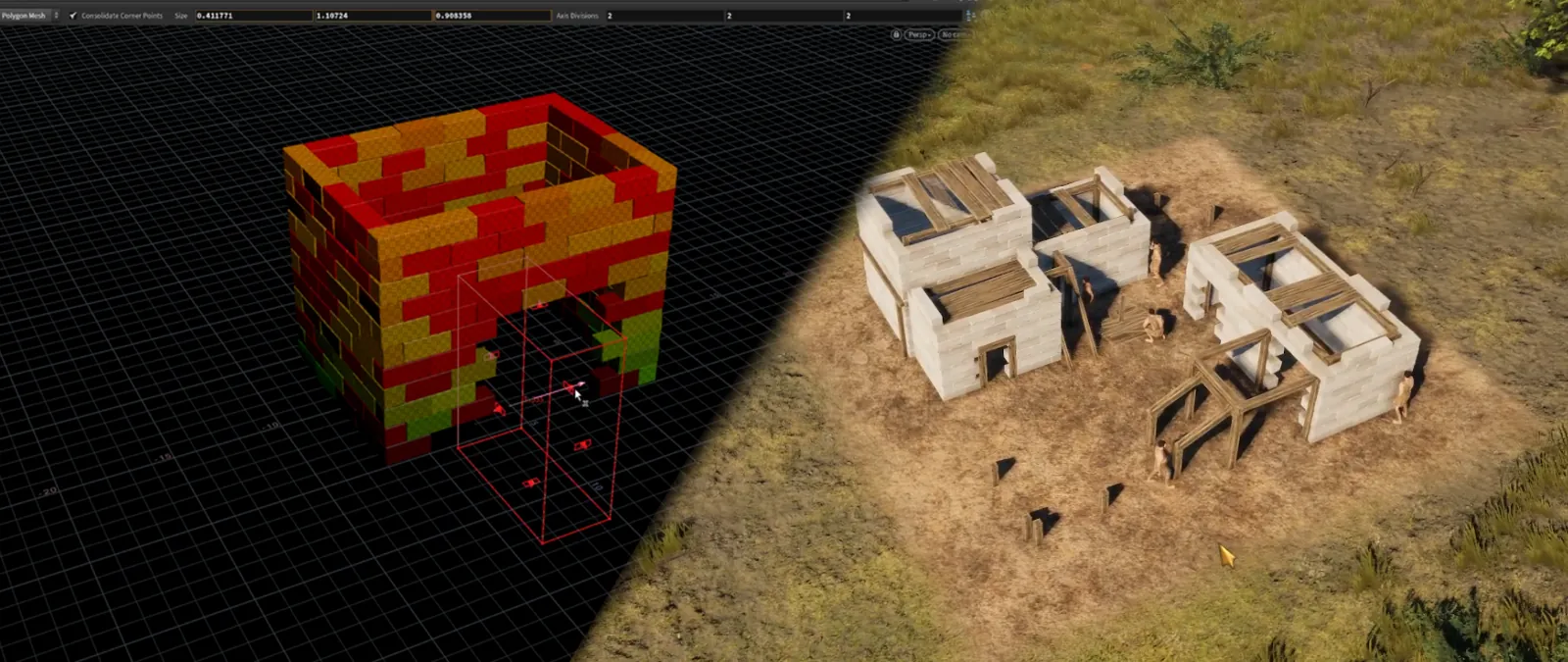
Overview
Challenge
We were only a few months away from release, and none of our buildings had been designed with a construction system in mind.
We needed to support roughly 70 unique buildings, each with three construction stages and animated progression between them.
After discussing the task with the environment artists, the estimated production time was between three and five months if every stage had to be created manually.
Solution
I started by prototyping a procedural building generation tool in Houdini. The goal was to create a fast pipeline capable of automatically generating semi-random brick placement and construction stages.
The tool was later converted into a Houdini Digital Asset (HDA) and integrated directly into Unity, allowing artists to iterate without leaving the engine.
Result
~70 buildings
3 construction stages each
300+ generated construction states
Completed in 3 weeks instead of an estimated 3-5 months
Houdini
Brick Placement
Brick placement is driven almost entirely by the logic shown below.
To preserve the alternating brick pattern, every second layer is rotated by 180 degrees.
# Distance between points on line
pointDistance = gridSizeX / ceil(gridSizeX) / maxBrickLength

# Brick Scale
brickCount = ceil(gridSizeX / maxBrickScale)
actualBrickWidth = gridSizeX / brickCount
brickScale = actualBrickWidth / brickLength
Mesh Modification
Point Displacement
Points are randomly selected and slightly offset in random directions.
This helps break up perfectly flat surfaces and creates a more natural-looking construction.
Vertex Colors
Channel R
Each brick stores its construction layer index.
Randomly selected bricks have their index shifted to a higher layer, creating gaps between bricks and making the building process appear more organic.
Channel G
Used to select between texture variations.
In Builders of Greece, buildings could blend between two different textures based on this channel.
Channel B
Currently unused and reserved for future extensions.
Brick Removal
Bricks can be removed using bounding boxes.
Inside the engine these are represented by transformable cubes that can be moved, rotated, and scaled.
This allows artists to quickly create doors, windows, and custom construction patterns.
Circular Construction
The same procedural placement system can also generate structures along circular paths.
The logic is identical to the linear version, with the only difference being that bricks are distributed around a circle rather than along a straight line.
HDA
The tool was packaged as a Houdini Digital Asset (HDA) and integrated directly into Unity.
This allowed artists to work entirely inside the engine without the need to export assets back and forth between Unity and Houdini, significantly improving iteration speed.
Shaders
Brick Elements
Brick geometry uses the vertex color R channel generated during the Houdini process.
Each construction layer stores a normalized index value between 0 and 1.
The shader compares this value against the current construction progress and reveals individual layers over time.
Wooden Elements
Scaffolding uses the same indexing approach as brick elements but appears using dithering-based transitions.
This creates a smoother visual effect during construction.
The same technique was tested for bricks but produced less convincing results than simple layer-based revealing.
All wooden elements were packed into a single texture atlas, allowing them to be merged into a single mesh and reducing draw calls.
Tools
Several supporting tools were created to streamline the workflow:
- A tool for quickly painting scaffold construction indices. Each scaffold element could store a normalized index.
- A mesh-combining tool that allowed artists to freely assemble scaffolding and merge everything into a single optimized mesh once finished.
- A material debugging tool used to visualize and validate construction indices.
Additionally, I created a simple Scriptable Object-based system for storing construction timing data.
Once an artist finished assigning construction indices, they could generate a configuration asset with a single click.
This removed the need for manual data transfer between artists and programmers, reducing implementation errors and simplifying the workflow.
Media
WIP